
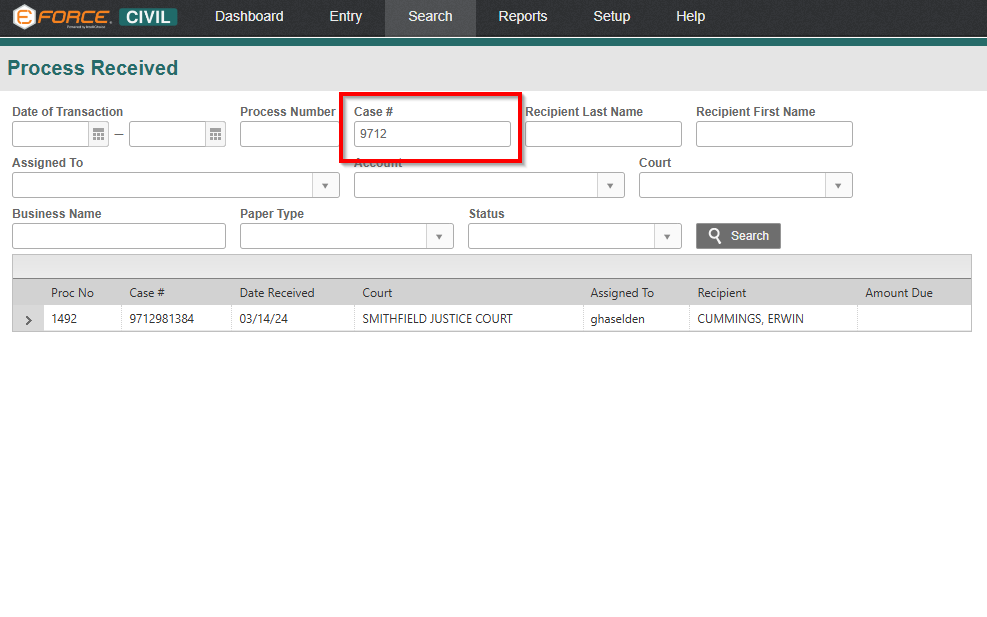
We are excited to introduce a new enhancement to the Civil Module that improves efficiency and accuracy when locating received processes. Users can now search by Court Case Number directly within the Process Received search function.
This new capability allows users to quickly locate a specific received process by entering a full or partial court case number. The search is flexible, meaning it can return results that match all or part of the entered criteria, making it easier to find records even when only limited information is available.
To further support this functionality, a Case # column has been added to the search results table. This ensures users can clearly correlate each result with the search criteria, reducing confusion and improving confidence in the data retrieved.
With this enhancement, users can now:
- Quickly locate processes using only a court case number
- Identify relevant records through partial or full matches
- Easily verify results with the newly added Case # column
This update streamlines workflows within the Civil Module by making it faster and more intuitive to find specific processes. As a result, users can more efficiently complete tasks such as processing payments and managing related transactions.
Overall, this feature simplifies the search experience and enhances productivity by providing direct access to critical information when it’s needed most.